Advanced Tabs: User & AI-Ready Structure for SharePoint
With Advanced Tabs for SharePoint, you can organize multiple web parts into clearly defined tab sections, reduce scrolling, and create clean, application-style page layouts. Improve usability, enhance visual clarity, and introduce structured content boundaries that support Microsoft Copilot and AI agents. Revolutionize your SharePoint with Advanced Tabs and see how intelligent structure transforms the way users – and AI – interact with your content.
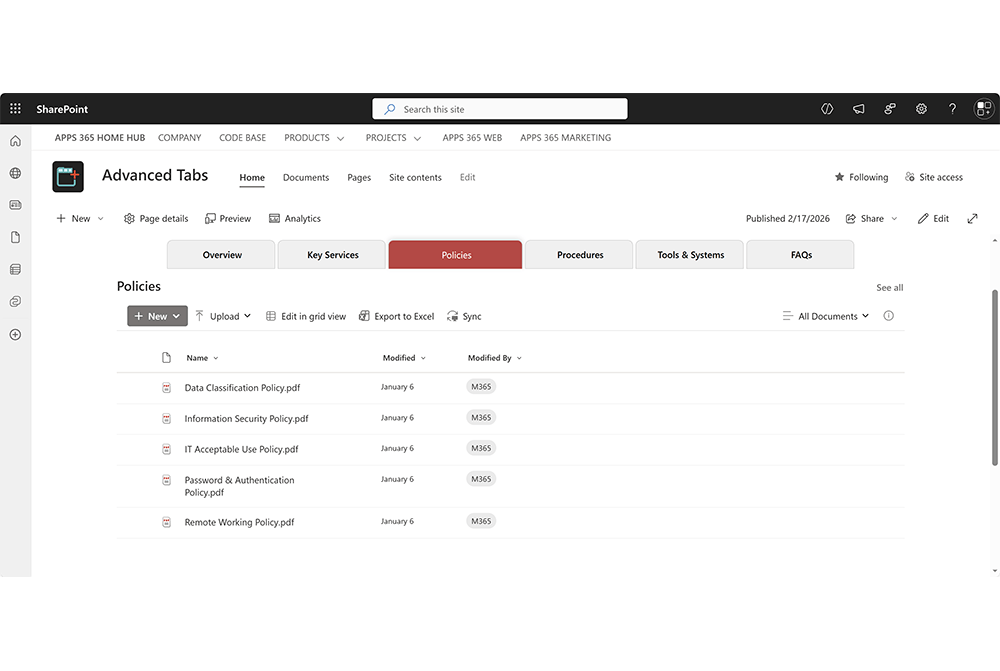
Take Your SharePoint to the Next Level with Advanced Tabs for SharePoint
Are you looking for a way to make your SharePoint site cleaner, easier to navigate, and more structured? Advanced Tabs for SharePoint helps transform long, cluttered pages into organized, application-style layouts.
Advanced Tabs allows you to group multiple web parts into clearly defined tab sections, each presenting focused content within a structured boundary. This means you can create a more dynamic and engaging user experience without overwhelming your page with excessive scrolling or stacked content. By introducing logical segmentation, you improve usability for users while also providing clearer structure for Microsoft Copilot and Al agents to interpret your content more effectively.
Improve SharePoint. Here’s How…
Overall, Advanced Tabs helps transform SharePoint into a more structured, user-friendly environment by reducing clutter, improving navigation, enhancing visual consistency, and introducing clear content boundaries that benefit both users and AI agents.
Improved navigation
Advanced Tabs groups related web parts into clearly labeled tab sections, making large SharePoint pages easier to navigate while creating structured content boundaries that AI agents can interpret more accurately.
Modern, Structured Experience
Tabbed layouts create a clean, application-style interface that improves visual clarity and establishes logical content segmentation for both users and AI-driven systems.
Improved Accessibility & Clarity
Clear tab labels and structured grouping enhance accessibility for users while also providing AI agents with more consistent signals about content relationships and hierarchy.
AI-Ready Content Organization
Advanced Tabs organizes content into defined sections that improve contextual understanding for Copilot and enterprise AI agents, supporting more accurate summaries and smarter content retrieval.
Enhanced usability
By displaying only relevant content at a time, Advanced Tabs reduces cognitive load for users and introduces predictable structure that helps Microsoft Copilot and AI agents understand page context more clearly
Increased productivity
Users find information faster through structured tab navigation, and AI agents benefit from clearer content boundaries - improving efficiency across both human and AI-assisted workflows.
Frequently asked questions
Advanced Tabs is a modern SharePoint Framework (SPFx) web part that transforms long, cluttered SharePoint pages into structured, tab-based layouts. It groups related web parts into clearly defined sections, reducing scrolling and improving navigation while introducing logical content boundaries that benefit both users and Al agents.
Advanced Tabs organizes web parts into structured tab containers rather than leaving them stacked vertically. Each tab creates a defined content boundary with a clear label, making page layout more predictable, easier to navigate, and more logically segmented.
This structured grouping improves content clarity for users and provides cleaner contextual signals for Microsoft Copilot and enterprise AI agents.
Copilot and AI agents interpret page structure, context, and content relationships when generating summaries or retrieving information.
Advanced Tabs helps by:
Creating clear content segmentation
Grouping related web parts under semantic tab labels
Reducing mixed-context content blocks
Introducing predictable DOM boundaries
Making page sections easier to interpret
This can improve contextual understanding, reduce ambiguity, and support more accurate AI-generated responses.
Advanced Tabs uses an optimized DOM reparenting approach built within SPFx. Instead of duplicating or iframe-wrapping content, it safely moves existing web part elements into a centralized tab container while preserving their original structure and lifecycle.
This approach:
Maintains performance
Avoids unnecessary re-rendering
Prevents ID conflicts through scoped zone detection
Preserves compatibility with modern SharePoint editing
The result is a clean structural layout without breaking native SharePoint behavior.
No. Advanced Tabs is built using SPFx and works natively within SharePoint Online. It does not duplicate content or introduce external rendering layers. By structuring content into tabs, it can actually improve perceived performance by displaying only relevant content at a time.
Instead of stacking all web parts vertically, Advanced Tabs displays one logical section at a time within a tab. Users can switch between sections instantly without navigating away from the page, significantly reducing vertical scrolling on content-heavy pages.
Advanced Tabs runs entirely within your Microsoft 365 tenant. It does not transmit or store SharePoint data outside your environment. It operates as a SharePoint-hosted SPFx solution and respects existing permissions and governance controls.
Yes. Clear tab labeling, structured grouping, and predictable navigation improve accessibility. Advanced Tabs supports keyboard interaction and structured navigation patterns to align with accessibility best practices.
Yes. Advanced Tabs is fully responsive and supports desktop, tablet, and mobile layouts. Horizontal and vertical configurations adapt to provide a clean experience across screen sizes.
Yes. Advanced Tabs includes a full-featured 7-day free trial. After the trial period, a license is required to continue using the web part.
Simple And Flexible Pricing
Please Contact Us if you require any additional information about our licensing. Licenses are based on the total number of Tenant users.
Site License
999
£
PerYear
Up to 500 Tenant Users In Organisation
1 Site
Latest Updates
Premimum Support
SharePoint Versions: Online, 2019
Site Collection
2499
£
PerYear
Up to 2500 Tenant Users In Organisation
Unlimited Sites in 1 Site Collection
Latest Updates
Premimum Support
SharePoint Versions: Online, 2019
Tenant
3999
£
PerYear
Up to 10000 Tenant Users In Organisation
Unlimited Sites in Tenant
Latest Updates
Premimum Support
SharePoint Versions: Online, 2019
Have more questions? Contact Us via APPS 365 LTD

Build the Future, Work Smarter.
Company No: 13955007
VAT No: GB 411473233

Address: 20-22 Wenlock Road, London N1 7GU

Email: info@apps365ltd.com

Phone: +44 (0)20 3890 3026





OUR PRODUCTS